G6Flow® BEI
Component description.
In Global SEIS, we are concerned with accelerating the production times of the products and the security necessary to ensure that incidents of infiltration and theft of information in organizations do not occur.This is why through our components and with a strategy of use of very little code, we propose from common components that are used to define the design of APIS such as Swagger or Open API, generate the necessary crude behaviors to initiate communication between components of various types, within the inventory of technological and computer assets of the industries.
Component featuresS
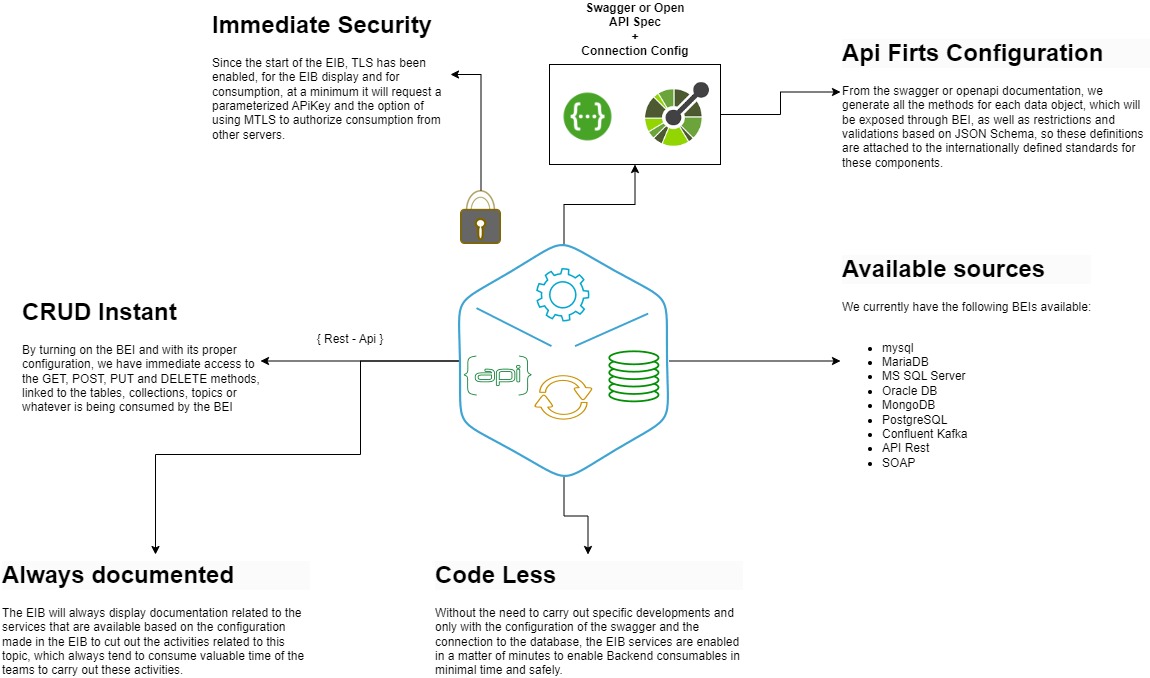
To this end, the Bei (Back-End Integrator) design, this component allows to reduce the development time of backend components, using native reading and writing capabilities of common systems to expose them in restful form, which can be placed behind of the Xposer Server or behind an API Gateway such as Gravitee.io, CA, IBM, Apigee, etc.
Configuration and deployment
The BEI configuration (Back-End Integrator), is available for any K8S, Docker or VM Appliance service.
Compatibility and form factors
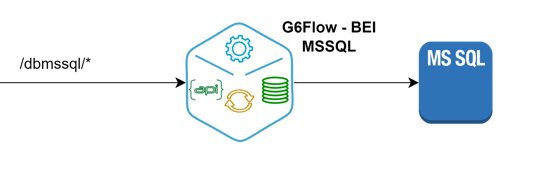
BEI-MSSQL
The way of working of the BEI is through HTTP protocol, customers access through a URI compatible with the protocol indicated above.
Since the start of the BEI, TLS has been enabled, for the BEI display and for consumption, at a minimum it will request a parameterized APiKey and the option of using MTLS to authorize consumption from other servers.
From the swagger or openapi documentation, we generate all the methods for each data object, which will be exposed through BEI, as well as restrictions and validations based on JSON Schema, so these definitions are attached to the internationally defined standards for these components.
By turning on the BEI and with its proper configuration, we have immediate access to the GET, POST, PUT and DELETE methods, linked to the tables, collections, topics or whatever is being consumed by the BEI.
The BEI will always display documentation related to the services that are available based on the configuration made in the EIB to cut out the activities related to this topic, which always tend to consume valuable time of the teams to carry out these activities.
Database connection configuration
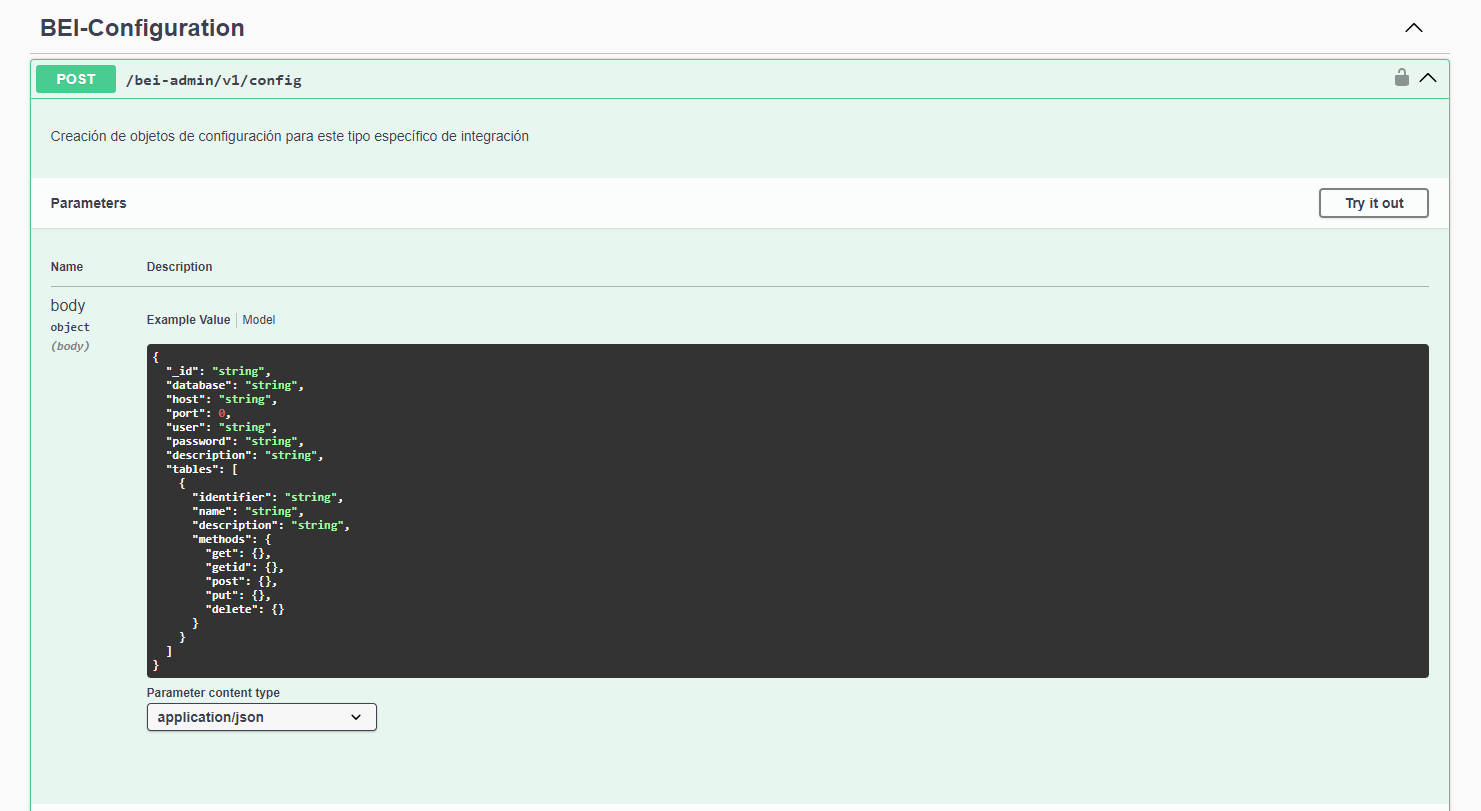
- The BEI configuration is done by means of the front enabled for each bei which is in swagger format and its income is through the following route: https://ip_bei:port_bei/bei-admin/v1/docs/static/Index.html#/, from this route the following operations can be carried out.
- Configuration of the methods to be used (Get, Post, Put, Delete).
- The connection of the BEI with the MSSQL databases is made through a native library.
-
Selection of tables and parameterization of methods for each table to expose.
-
After the initial configuration of the BEI, through the enabled methods, from the front you can test each method enabled as shown below:
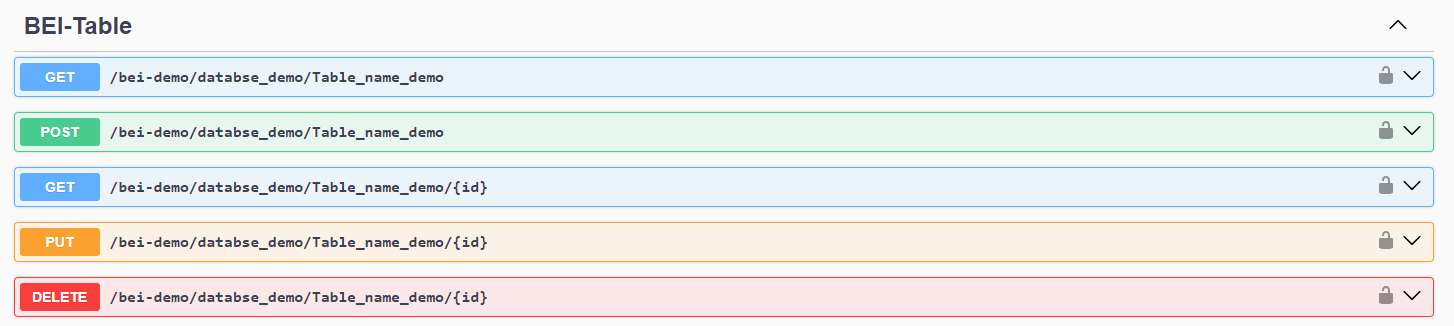
This occurs thanks to the load of the Schema of the Tables to be exposed as Rest Service, thus enabling the administration of the CRUD in MSSQL databases in a practical and quickly.
BEI File Data Transfer
The BEI File Data Transfer is an additional component of G6Flow BEI, designed to facilitate file transfers between systems through a RESTful interface. This component is ideal for scenarios requiring secure and efficient file handling within a microservices architecture or complex integrations.
BEI File Data Transfer Features
The BEI File Data Transfer allows users to upload, and list files from and to specific directories. This component integrates seamlessly with other services and systems within the G6Flow ecosystem, enabling secure file transfer operations based on detailed access and control policies.
- File Upload: Allows users to upload files to a specific directory on the server.
- File Listing: Provides a list of files within a specific directory.
- File Type and Size Validation: Implements restrictions based on allowed file types and maximum file size to ensure system integrity.

Configuration and Deployment
The configuration of BEI File Data Transfer follows a similar approach to other BEI components. This component can be deployed on any K8S, Docker, or VM Appliance service.
File Transfer Configuration
The configuration of BEI File Data Transfer is performed through a Swagger-enabled front-end, accessible via the following route:
- Configuration Route:
https://ip_bei:port_bei/bei-admin/v1/docs/static/index.html#
From this interface, the following aspects of the service can be configured:
- Base Directory: Configuration of the directory where files will be stored.
- Allowed File Types: Definition of the file types that can be uploaded to the server.
- Maximum File Size: Configuration of the maximum allowed file size for transfers.
- Overwrite Policies: Definition of whether overwriting existing files is allowed.
Configuration and Usage Example
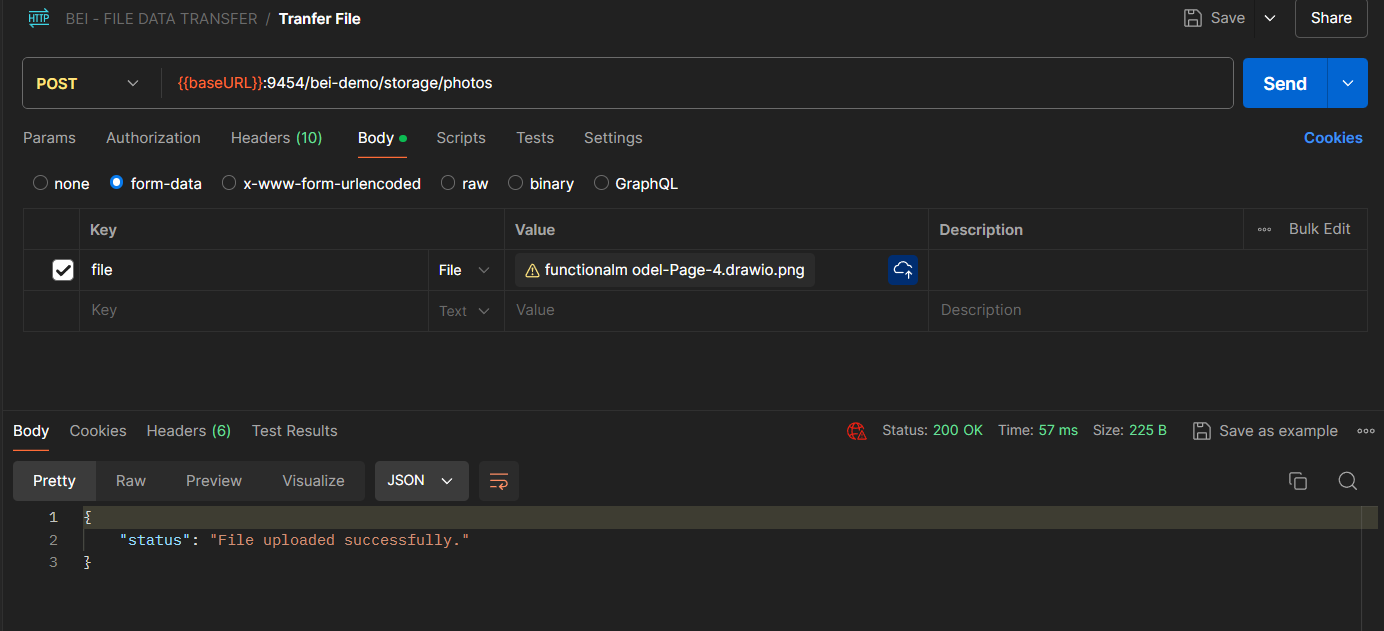
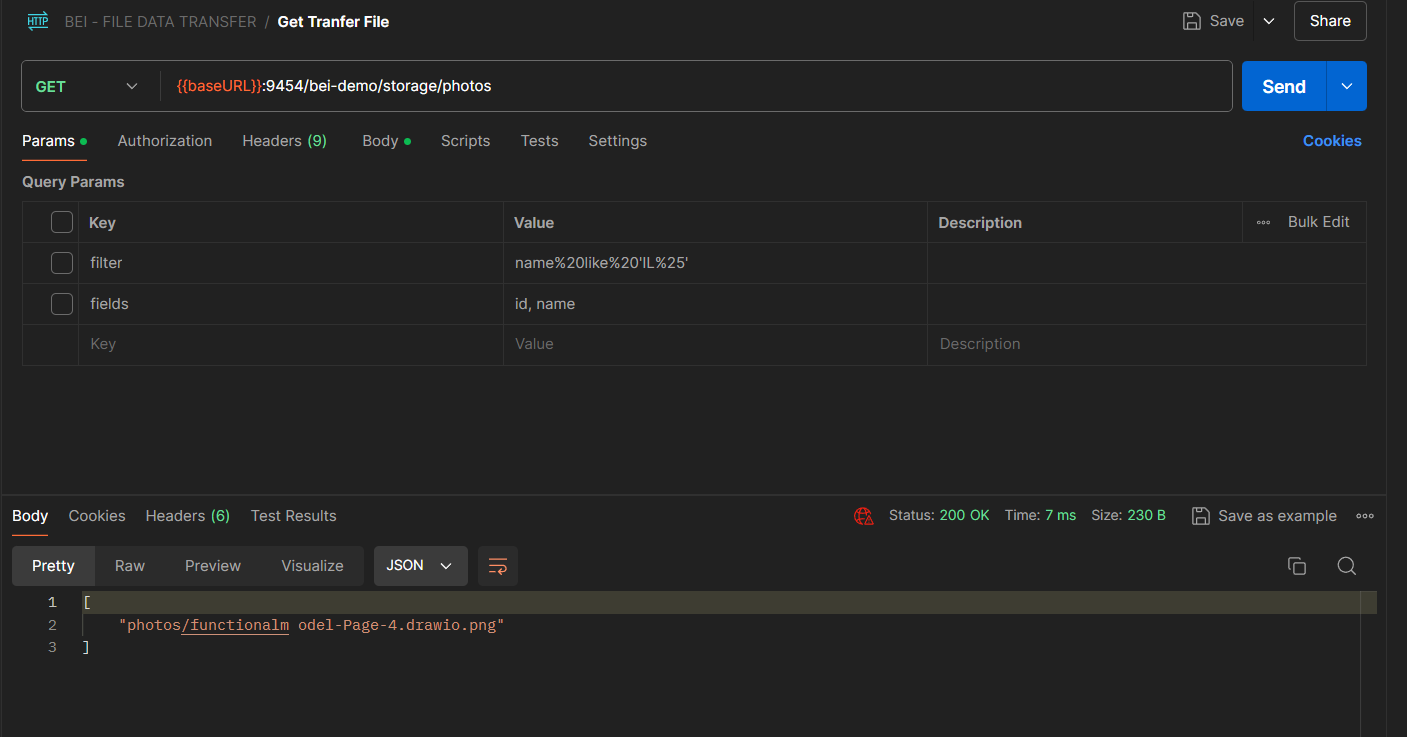
Once BEI File Data Transfer is configured, users can interact with it using standard HTTP methods. Below are some visual examples of how to use the front-end to configure and utilize this service.
- File Upload:
- Access the POST method in the Swagger interface to upload a file to a specific directory.
- Specify the file to be uploaded and select the overwrite option if necessary.
- File Listing:
- Use the GET method to obtain a list of all files present in a specific directory.
- This is useful for verifying which files are available for download or management.
Compatibility and Form Factors
The BEI File Data Transfer is compatible with a wide range of operating systems and deployment environments. Like other BEI components, it can be placed behind API Gateway servers such as Gravitee.io, CA, IBM, Apigee, among others.
As with other BEI services, this component uses TLS from the start to ensure all file transfers are protected. Additionally, requests to the service must include an API Key and may optionally require MTLS authentication.
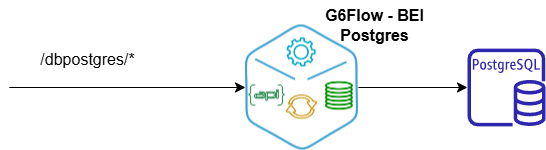
BEI PostgreSQL
The G6Flow BEI PostgreSQL is a back-end integrator designed to streamline communication with PostgreSQL databases. This component simplifies the development of APIs by exposing native reading and writing functionalities of PostgreSQL as RESTful services. It provides a secure and efficient way to interact with one or multiple PostgreSQL databases.
The BEI PostgreSQL enables CRUD (Create, Read, Update, Delete) operations linked to database tables, with configurable methods, validations, and schema-based restrictions, ensuring compliance with international standards.
BEI PostgreSQL Component features
The BEI PostgreSQL is built to:
- Reduce Development Time: By leveraging native PostgreSQL capabilities and exposing them via REST APIs, developers can focus on business logic instead of database interfacing.
- Ensure Security: Supports HTTPS with MTLS authentication, API Key validation, and encrypted credentials management.
- Provide Flexibility: Dynamic configuration of tables, methods, and parameters for CRUD operations.
- Enable Scalability: Can connect to multiple PostgreSQL databases, configured through JSON files.
- Optimize Performance: Uses native PostgreSQL libraries for database connections, ensuring high efficiency and reduced latency during data operations.
Configuration and Deployment
The BEI PostgreSQL can be deployed in any environment, including:
- Kubernetes (K8S)
- Docker containers
- Virtual Machines (VMs)
BEI PostgreSQL Configuration
The configuration of BEI File Data Transfer is performed through a Swagger-enabled front-end, accessible via the following route:
- Configuration Route:
https://ip_bei:port_bei/bei-admin/v1/docs/static/index.html#
The BEI PostgreSQL establishes connections using native PostgreSQL libraries, which ensures optimal performance, better management of resources, and seamless integration with the database engine. These libraries are designed to handle high concurrency and large datasets efficiently, making them ideal for enterprise-grade applications.
Database configuration is managed via a centralized configuration file, where details such as database credentials, host, and exposed tables are defined. This approach allows for dynamic updates without requiring significant changes to the BEI’s codebase.
Once configured, the BEI automatically maps the specified tables to RESTful endpoints, enabling immediate access to CRUD operations. This streamlined process accelerates development and reduces the risk of errors associated with manual database interactions.
Database Connection Configuration
Configuration is managed through the config.json file, where each database is defined with the following properties:
- Database: Name of the database.
- Host: Server address.
- Port: Connection port (default: 5432).
- User: Database user.
- Password: Encrypted password.
- SecuredKey: Key for decrypting the password.
- Tables: Tables to be exposed, including methods (GET, POST, PUT, DELETE) and their parameters.
API Methods & Interaction
Once BEI PostgreSQL is configured, users can interact with it using standard HTTP methods.The BEI PostgreSQL provides full CRUD functionality:
- GET Request:
- Endpoint: /api/v1/{table}
- Description: Retrieves all records from the specified table. Optional parameters allow filtering and selecting fields.
-
Example: GET /api/v1/logs?filter=id>10&fields=id,x_timestamp This request fetches records where id > 10 and returns only the fields id and x_timestamp.
-
POST Request:
- Endpoint: /api/v1/{table}
- Description: Inserts a new record into the specified table.
-
Example: POST /api/v1/logs Content-Type: application/json
{ "id": "123", "x_request_id": "abc-123", "x_timestamp": "2024-11-19T12:00:00Z" }
-
PUT Request:
- Endpoint: /api/v1/{table}/{id}
- Description: Updates an existing record identified by {id}.
-
Example: PUT /api/v1/logs/123 Content-Type: application/json { "x_timestamp": "2024-11-19T13:00:00Z" }
-
DELETE Request:
- Endpoint: /api/v1/{table}/{id}
- Description: Deletes a record identified by {id}.
- Example: DELETE /api/v1/logs/123
Compatibility and form factors
The BEI PostgreSQL operates over HTTPS, ensuring secure communication with databases. It integrates seamlessly with API Gateways like Gravitee.io, Apigee, and IBM API Connect. The BEI also adheres to OpenAPI standards, enabling standardized documentation and easier integration.
By default, the BEI enforces TLS encryption for all connections, requires API Keys for authentication, and supports optional MTLS authentication for secure server-to-server communication.
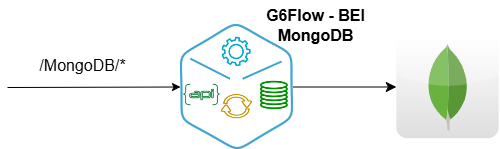
BEI MongoDB
Component Description
The BEI MongoDB is a back-end integrator designed to facilitate interaction with MongoDB databases. It exposes MongoDB's native read and write capabilities via RESTful services, providing a secure and efficient way to connect to one or multiple MongoDB databases.
Features
- Accelerated Development: Reduces development time by allowing developers to focus on business logic instead of database integration.
- Advanced Security: Supports HTTPS with MTLS, API Key validation, and encrypted credentials management.
- Flexibility: Dynamically configures collections, methods, and parameters for CRUD operations.
- Scalability: Compatible with multiple MongoDB databases, configured through JSON files.
- Optimized Performance: Uses native MongoDB libraries to handle high concurrency and large datasets.
Configuration and Deployment
The BEI MongoDB can be deployed on various platforms: - Kubernetes (K8S). - Docker containers. - Virtual Machines (VMs).
Configuration
The configuration is managed via a Swagger-enabled graphical interface, making it quick and user-friendly. This interface allows administrators to:
- Add MongoDB databases.
- Define collections and CRUD methods.
- Update settings dynamically without modifying files manually.
Access the configuration at:
https://ip_bei:port_bei/bei-admin/v1/docs/static/index.html#
Example Configuration JSON Structure
{
  "host": "localhost",
  "database": "exampleDB",
  "port": 27017,
  "user": "admin",
  "password": "encryptedPassword==",
  "description": "Demo MongoDB database",
  "tables": [
    {
      "identifier": "_id",
      "name": "users",
      "description": "User data collection",
      "methods": {
        "get": {
          "description": "Fetch user data",
          "tags": ["BEI-Collection"]
        },
        "post": {
          "description": "Add a new user"
        },
        "put": {
          "description": "Update user information"
        },
        "delete": {
          "description": "Delete a user"
        }
      }
    }
  ]
}
API Methods & Interaction
Once configured via the Swagger interface, the BEI MongoDB provides the following HTTP methods:
- GET Request:
- Endpoint: /api/v1/{table}
- Description: Retrieves all records from the specified collection. Optional parameters allow filtering and selecting fields.
-
Example: GET /api/v1/users?fields=name,email This request fetches all records from the users collection and returns only the name and email fields.
-
POST Request:
- Endpoint: /api/v1/{table}
- Description: Inserts a new document into the specified collection.
-
Example: POST /api/v1/users Content-Type: application/json
json { "name": "Jane Doe", "email": "jane.doe@example.com" } -
PUT Request:
- Endpoint: /api/v1/{collection}/{id}
- Description: Updates an existing document identified by {id} in the collection.
-
Example: PUT /api/v1/logs/123 Content-Type: application/json
json { "x_timestamp": "2024-11-19T13:00:00Z" } -
DELETE Request:
- Endpoint: /api/v1/{table}/{id}
- Description: Deletes a document identified by {id} in the collection.
- Example: DELETE /api/v1/users/123
Compatibility and form factors
The BEI MongoDB operates over HTTPS, ensuring secure communication with databases. It integrates seamlessly with API Gateways like Gravitee.io, Apigee, and IBM API Connect. The BEI also adheres to OpenAPI standards, enabling standardized documentation and easier integration.
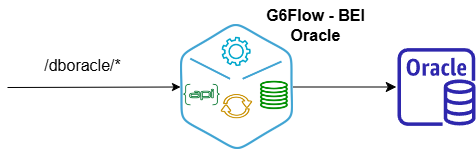
BEI Oracle
The G6Flow BEI Oracle is a backend integrator designed to simplify interaction with Oracle databases. This component exposes native read and write capabilities as RESTful services, providing a secure and efficient way to interact with one or multiple Oracle databases.
Oracle Features
The BEI Oracle is designed to:
- Reduce Development Time: By exposing Oracle's native functionalities through REST APIs, developers can focus on business logic rather than database interfacing.
- Ensure Security: Supports HTTPS, MTLS authentication, API Key validation, and encrypted credential management.
- Provide Flexibility: Dynamic configuration of tables, methods, and parameters for CRUD operations.
- Enable Scalability: Can connect to multiple Oracle databases configured through an easy-to-use Swagger interface.
- Optimize Performance: Utilizes Oracle native libraries for database connections, ensuring high efficiency and low latency in data operations.
Configuration and Deployment
The BEI MongoDB can be deployed on various platforms: - Kubernetes (K8S). - Docker containers. - Virtual Machines (VMs).
BEI Oracle Configuration
The configuration of the BEI Oracle is conducted through a user-friendly web interface enabled by Swagger, accessible via the following route: - Configuration Route: https://ip_bei:port_bei/bei-admin/v1/docs/static/index.html#
Through this interface, users can easily define the structure and interaction settings for the BEI Oracle.
- Database and Table Configuration: Using the Swagger-enabled interface, users can add Oracle databases and tables dynamically without modifying configuration files directly. Tables and their associated CRUD methods can be parameterized and tested directly through the web interface.
Configuration JSON Structure
When configuring the BEI Oracle, a JSON structure defines the database and its properties. This JSON includes:
{
  "host": "localhost",
  "port": 1521,
  "database": "exampleDB",
  "user": "admin",
  "password": "encryptedPassword==",
  "securedKey": "encryptionKey",
  "tables": [
    {
      "name": "employees",
      "identifier": "id",
      "methods": {
        "get": {
          "description": "Fetch employee records",
          "tags": ["BEI-Table"]
        },
        "post": {
          "description": "Add a new employee"
        },
        "put": {
          "description": "Update employee information"
        },
        "delete": {
          "description": "Delete an employee"
        }
      }
    }
  ]
}
- host: The database server's hostname or IP address.
- port: The port used for the connection (default: 1521 for Oracle).
- database: Name of the Oracle database.
- user: Database username.
- password: Encrypted password for secure access.
- securedKey: Key for decrypting the password.
- tables: An array of table configurations, including:
-
- name: The name of the table.
-
- identifier: The unique identifier field (e.g., primary key).
-
- methods: Defines the CRUD methods and their descriptions.
API Methods & Interaction
Once configured via the Swagger interface, users can interact with the BEI Oracle using standard HTTP methods. The following endpoints are automatically generated for the specified tables:
- GET Request:
- Endpoint: /api/v1/{table}
- Description: Retrieves all records from the specified table. Optional parameters allow filtering and selecting fields.
-
Example: GET /api/v1/employees?filter=department='HR'&fields=id,name
-
POST Request:
- Endpoint: /api/v1/{table}
- Description: Inserts a new record into the specified table.
-
Example: POST /api/v1/employees Content-Type: application/json
json { "id": "123", "name": "John Doe", "department": "Finance" } -
PUT Request:
- Endpoint: /api/v1/{table}/{id}
- Description: Updates an existing record identified by {id}.
-
Example: PUT /api/v1/employees/123 Content-Type: application/json
json { "department": "IT" } -
DELETE Request:
- Endpoint: /api/v1/{table}/{id}
- Description: Deletes a record identified by {id}.
- Example: DELETE /api/v1/employees/123
Compatibility and form factors
The BEI Oracle operates over HTTPS, ensuring secure communication with databases. It integrates seamlessly with API Gateways like Gravitee.io, Apigee, and IBM API Connect. The BEI also adheres to OpenAPI standards, enabling standardized documentation and easier integration.
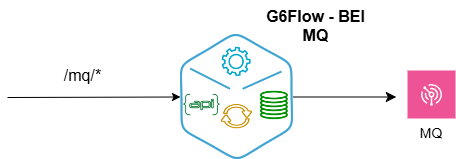
G6Flow® BEI IBM MQ
Component Description
The BEI IBM MQ is a back-end integrator developed to securely connect to IBM MQ instances. It enables robust operations on message queues, such as publishing and retrieving messages, using dynamic configurations and a modular design.
Features
- Secure Connections: Utilizes HTTPS certificates and credential-based authentication for secure communication.
- Message Management: Supports GET and POST operations for interacting with IBM MQ queues.
- Dynamic Configuration: Stores settings in JSON files and SQLite databases for flexibility.
- Scalability: Designed to easily integrate into environments with multiple message queues.
- Kafka Compatibility: Offers optional interoperability for publishing messages to Kafka topics.
Configuration and Deployment
The BEI IBM MQ can be deployed on Kubernetes (K8S), Docker, or virtual machines (VMs).
Configuration
The configuration for BEI IBM MQ is managed via a JSON file (data/config.json).
Below is an example of the JSON structure:
{
  "app_user": "your_username",
  "app_password": "your_password",
  "mq": {
    "host": "your_ibmmq_host",
    "port": "your_ibmmq_port",
    "channel": "your_channel",
    "queue_name": "your_queue_name"
  }
}
Database Connection Configuration
The BEI IBM MQ is accessed via the following route: https://ip_bei:port_bei/bei-admin/v1/docs/static/index.html#
From this interface, you can perform the following operations:
Configure supported methods (GET, POST). Define connections to IBM MQ queues using native libraries. Parameterize methods for each queue.
API Methods & Interaction
Once configured, the BEI IBM MQ supports the following HTTP methods:
- GET Request:
- Endpoint: /mq
- Description: Retrieves messages from the specified queue.
-
Example: GET /mq
-
POST Request:
- Endpoint: /mq
- Description: Publishes a message to the specified IBM MQ queue.
- Example: POST /api/v1/users
Content-Type: application/json
json
   {
    "message": "Hello, MQ!"
   }
Compatibility and form factors
The BEI IBM MQ operates over HTTPS, ensuring secure communication with queues. It can be seamlessly integrated with API Gateways like Gravitee.io, Apigee, and IBM API Connect. Additionally, it adheres to OpenAPI standards for standardized documentation and easier integration.
By default, the BEI IBM MQ enforces TLS encryption for all connections, requires API Keys for authentication.
BEI Kafka
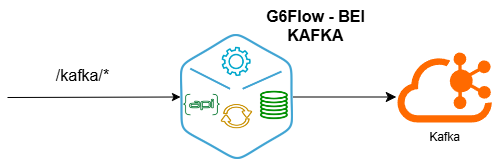
The BEI Kafka is a backend integrator designed to streamline communication with Kafka clusters. This component simplifies the process of producing messages to Kafka topics securely and efficiently. It supports dynamic configuration, API validation, and message encryption, ensuring secure and standardized integration with Apache Kafka.
Component Features
The BEI Kafka provides:
- Dynamic Kafka Connections: Connects to Kafka brokers defined in the configuration or environment variables.
- Secure Message Processing: Includes encryption and validation mechanisms for data security.
- RESTful Interface: Allows interaction with Kafka through standard HTTP methods.
- Scalability: Easily integrates with multiple Kafka clusters by modifying configurations.
- Documentation and Testing: Comes with a Swagger-enabled interface for exploring and testing endpoints.
Configuration and Deployment
The **BEI Kafka ** can be deployed on various platforms: - Kubernetes (K8S). - Docker containers. - Virtual Machines (VMs).
It supports TLS encryption and API key validation by default, ensuring secure communication between clients and Kafka
BEI Kafka Configuration Steps
- Access the Swagger Interface:
-
Configuration Route: https://ip_bei:port_bei/bei-admin/v1/docs/static/index.html#
-
Define Kafka Connections: Configure brokers and client ID in config.json or via environment variables (Through swagger Interface).
-
Enable Secure Communication: Provide HTTPS certificates and keys in the /certs directory (Contact Global Seis to set for all your BEI's).
Through this interface, users can easily define the structure and interaction settings for the BEI Kafka.
Compatibility and form factors
The BEI Kafka provides RESTful endpoints for interacting with Kafka topics.
API Methods & Interaction
Endpoints are documented and accessible through a Swagger interface, ensuring standardized integration with other services.
Example Use Case
- GET Request:
- Endpoint: /bei-default/audit
- Description: Retrieve configuration and metadata details.
-
Example: GET /api/v1/employees?filter=department='HR'&fields=id,name
-
POST Request:
- Endpoint: /bei-default/audit
- Description: Publish messages to Kafka topics.
- Example: POST /bei-default/audit
Content-Type: application/json
json
    {
    "headers": {
      "x-topic": "example-topic"
    },
      "body": {
        "key": "unique-key",
        "value": "message content"
      }
    }